
How to Access
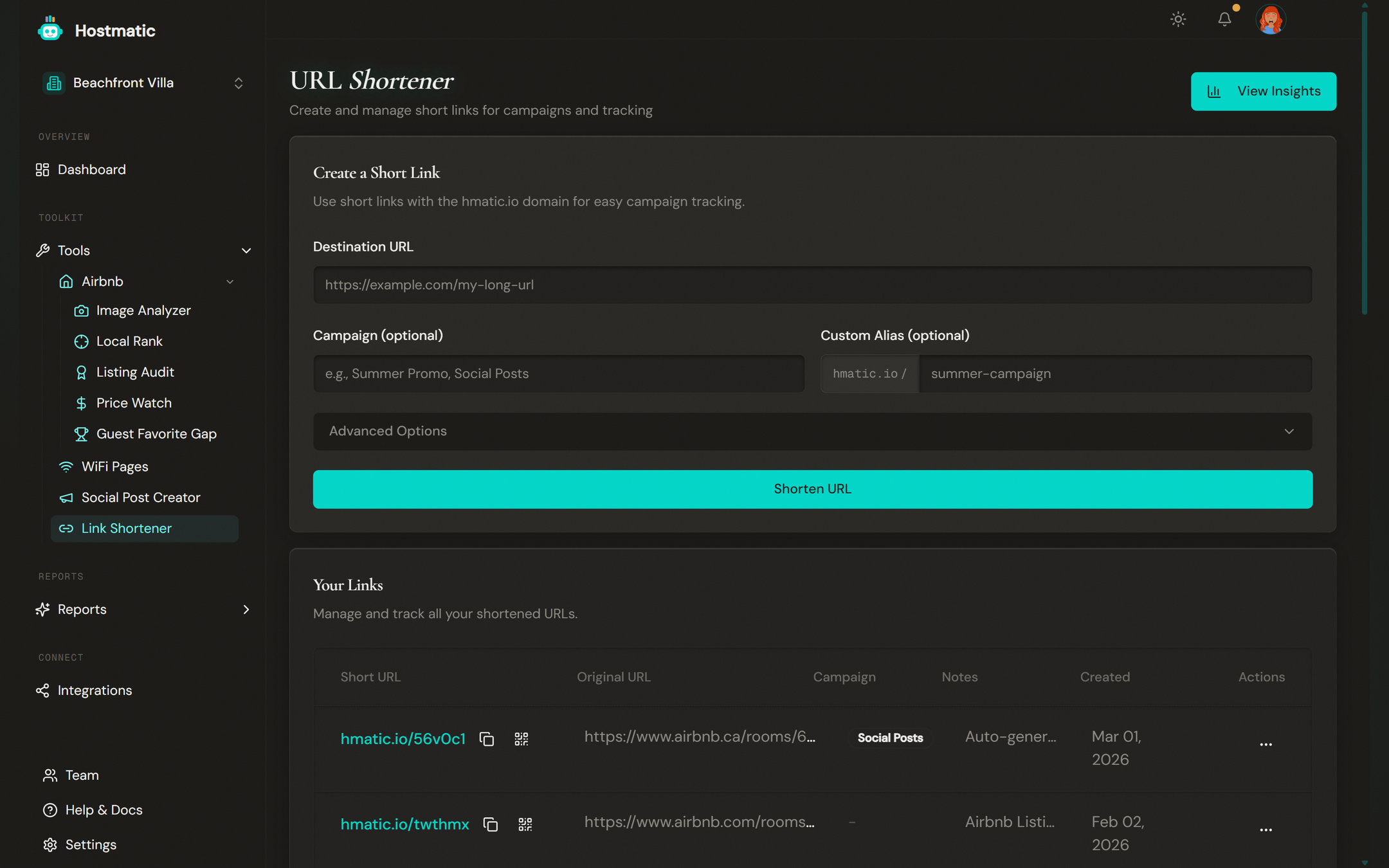
Click Link Shortener in the sidebar. The page title is "URL Shortener."
Step-by-Step: Create a Short Link
The Create a Short Link card contains the link creation form.
1. Enter the Destination URL
In the Destination URL field (placeholder: "https://example.com/my-long-url"), paste the full URL you want to shorten — your Airbnb listing, direct booking page, or any web page.
2. Set a Custom Alias (Optional)
In the Custom Alias (optional) field, type a memorable slug. The prefix "hmatic.io /" is shown to the left of the field. For example, typing "beach-house" creates hmatic.io/beach-house.
Rules: letters, numbers, hyphens, and underscores only. Max 20 characters. You'll see an error if the alias is taken.
3. Add a Campaign Tag (Optional)
In the Campaign (optional) field (placeholder: "e.g., Summer Promo, Social Posts"), type a campaign name to group this link with others. Autocomplete suggestions appear based on your existing campaigns.
4. Advanced Options
Click the Advanced Options collapsible section to expand additional fields:
UTM Tagging — Tag the destination URL above with UTM parameters for campaign tracking.
- Source — e.g., google, newsletter
- Medium — e.g., email, cpc, social
- UTM Campaign — e.g., summer_sale
- Term (optional) — e.g., vacation+rental (for paid search)
- Content (optional) — e.g., header_link, footer_cta
Quick UTM preset buttons and a "Final URL Preview" are also available in this section.
Notes (optional, max 200 characters) — Add internal notes about the link's purpose.
5. Create the Link
Click Shorten URL. Your shortened URL appears in a highlighted card with a Copy button. Click Copy to copy it to your clipboard — a "Copied to clipboard!" toast notification confirms it.
Your Links Table
Below the creation form, the Your Links card shows all your shortened URLs in a table with:
- Short URL (click to copy)
- Destination URL
- Click count
- Campaign tag
- Creation date
- Notes — hover any row to reveal the note you added when creating the link
QR Codes With Your Logo
Every link automatically gets a QR code. The center of the QR code carries the inline Hostmatic logo by default — and the QR generator now uses a vectored inline SVG so the logo stays sharp at any print size. White-label QR codes (Pro plan) replace the logo with your own brand mark.
View Analytics
Click the View Insights button (with a chart icon) in the top-right of the page header. This takes you to the Marketing report under Reports where you can see detailed click analytics.
What Gets Tracked
For every click, Hostmatic records:
- Total clicks and unique visitors (deduplicated via server-side fingerprinting)
- New vs. returning visitors
- Device type, browser, country/city
- Referrer and QR vs. direct split
Link Limits
The number of links you can create depends on your plan. Check your current usage at the top of the page.