
Each page focuses on one slice of that question. This guide is a map — start here, then click into the page that matches what you're trying to learn this week.
How to Access
- In the sidebar, click Reports to expand the menu
- Pick the page that matches your question (see the table below)
The Reports menu lists six pages. Small divider labels (Bookings, Marketing, Patterns) separate them, but there are no nested submenus:
- Overview — the high-level summary view
- AI Insights — auto-generated observations (all plans; Free sees 3 at a time, Weekend Host 6, Pro Host 10)
- Bookings — Direct vs OTA, per-platform, and Airbnb-specific analytics (paid plan)
- Marketing — channel correlation, campaigns, links, and organic social (all plans, with gated sections)
- Funnel Analysis — visitor-to-booking conversion funnel
- Seasonal Patterns — demand patterns by month/season (Weekend Host+)
Every report page has an "About this page" help icon next to its heading.
What's on the Overview Page
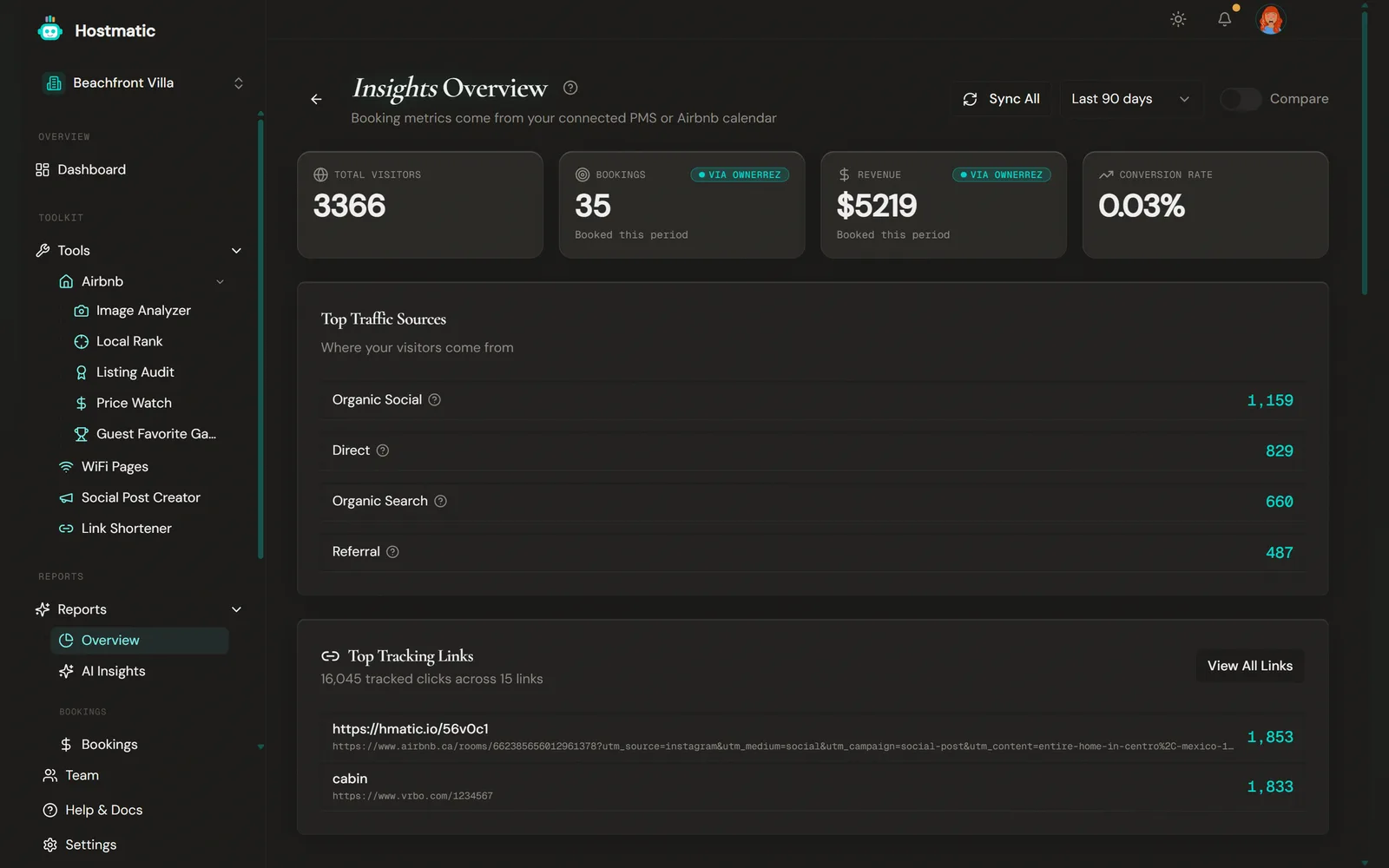
Overview is the summary of everything connected. It has a Sync All button (disabled when nothing is connected) and:
- KPI tiles: Total Visitors, Bookings, Revenue, Conversion Rate
- Top Traffic Sources and Top Tracking Links (with a link through to Marketing)
- Listing Health — Avg Audit Score, Avg Image Score and Guest Favorites, shown only when Airbnb is connected, each linking to its tool, plus a Run scans button
- Bookings by Source (renamed Other Booking Sources when the PMS widget already covers your PMS sources)
- A Conversion Funnel — Visitors → Sessions → Direct Bookings (OTA bookings are excluded)
- The PMS performance widget
What Each Page Answers
| If you want to know... | Open... | Plan |
|---|---|---|
| The top-line summary across all my data | Overview | All |
| Where my bookings are coming from across all channels (attribution) | Marketing | All (Attribution Honesty card needs a connected PMS) |
| Which UTM campaigns are converting | Marketing | Campaigns section requires Weekend Host+ |
| How my shortened links are performing | Marketing | All |
| How my organic social traffic is doing (from GA4) | Marketing | Social section requires Weekend Host+ |
| The full guest journey — view → click → book | Funnel Analysis | All |
| Direct bookings vs OTA bookings, side by side | Bookings | Paid |
| Booking.com vs Expedia vs Vrbo vs Airbnb performance | Bookings | Paid |
| How my Airbnb listings are performing (revenue, occupancy, per-listing) | Bookings | Paid |
| Auto-generated insights (Hostmatic surfaces what changed and why) | AI Insights | All |
| Seasonal demand patterns and how I should price | Seasonal Patterns | Weekend+ |
Where to Start
First-time host using Hostmatic for the first week or two:
- Overview — Get the big picture across all connected data.
- Marketing — See which channels are sending traffic and, if a PMS (Guesty or OwnerRez) is connected, how honest your attribution actually is.
- Funnel Analysis — See whether your bottleneck is traffic, click-through, or conversion.
Existing host running paid acquisition or content:
- Marketing — Verify that your campaigns and social traffic are showing up in booking data, not just click data.
- AI Insights — Let Hostmatic flag what changed (a traffic drop, a fast-growing traffic source, a shift in your direct-vs-OTA mix, a campaign that is underperforming).
Property manager with multiple listings:
- Bookings — How much of your business is direct vs commission-bearing, and how each OTA and each Airbnb listing is performing.
- Seasonal Patterns — Price and minimum-stay decisions for the next quarter.
Date Ranges and Plan Caps
Overview, Bookings, Marketing and Funnel Analysis have a date-range filter in the top-right: Last 7 / 14 / 30 / 90 days, Last 6 months, Last year. Seasonal Patterns uses a month selector instead (Last 6 / 12 / 24 months, default 12). AI Insights has no filter — each insight covers a fixed window, shown on its card.
Your plan limits how much history Hostmatic keeps:
| Plan | Max history |
|---|---|
| Free | 90 days |
| Weekend Host | 180 days |
| Pro Host | 365 days |
Funnel Analysis hides ranges above your limit. The other pages still list all six, but they only show data inside your plan's window.
Period-over-period comparison (current vs prior period side-by-side) requires Pro Host. The toggle is labelled Compare, and it is not available on AI Insights or Seasonal Patterns. It covers specific cards only — each page shows a note saying which. On Overview, that's the summary tiles, Top Traffic Sources and the tracking-link deltas.
Prerequisites for Reliable Data
Reports are only as good as the data flowing in. For full coverage:
- GA4 connected (Integrations, Weekend Host+) — required for visitors, sessions, campaigns and organic social on Marketing, and for Funnel Analysis
- A PMS (Guesty or OwnerRez, Weekend Host+) or Airbnb iCal connected — required for Bookings and any booking-attributed data
- Social Accounts connected (Weekend+ for social sections on Marketing) — publishing side of social; the organic social traffic shown on Marketing comes from GA4, not from your connected social accounts directly
- At least one Hostmatic short link — required for Top Links and the channel-correlation chart on Marketing. Top Campaigns comes from UTM-tagged traffic in GA4.
GA4 and PMS connections both require Weekend Host or higher. On Free, most report sections stay empty apart from short-link and Airbnb iCal data.
Hostmatic still works without these — pages will simply show partial data and an inline note telling you what's missing.
Common Questions
- My Marketing page has no Attribution Honesty card. — That card only appears when a PMS (Guesty or OwnerRez) is connected. Check Integrations.
- Why doesn't [page] show data older than X days? — Plan-capped. Free is 90, Weekend 180, Pro 365. Upgrade to extend.
- Where did Attribution / Campaigns / Link Performance / Social Performance go? — Merged into the Marketing report. Where did OTA Performance / Direct vs OTA / Airbnb Bookings go? — Merged into the Bookings report. The new pages cover the same ground in one place.
- Where did Guest Journeys go? — That page was retired. Marketing now covers attribution, and Funnel Analysis covers the journey step-by-step.