
How to Access
- In the sidebar, click Reports to expand the menu
- Click Funnel Analysis — it's a flat item in the Reports list, not nested under a sub-group
Route: /insights/funnel-analysis. Available on all plans.
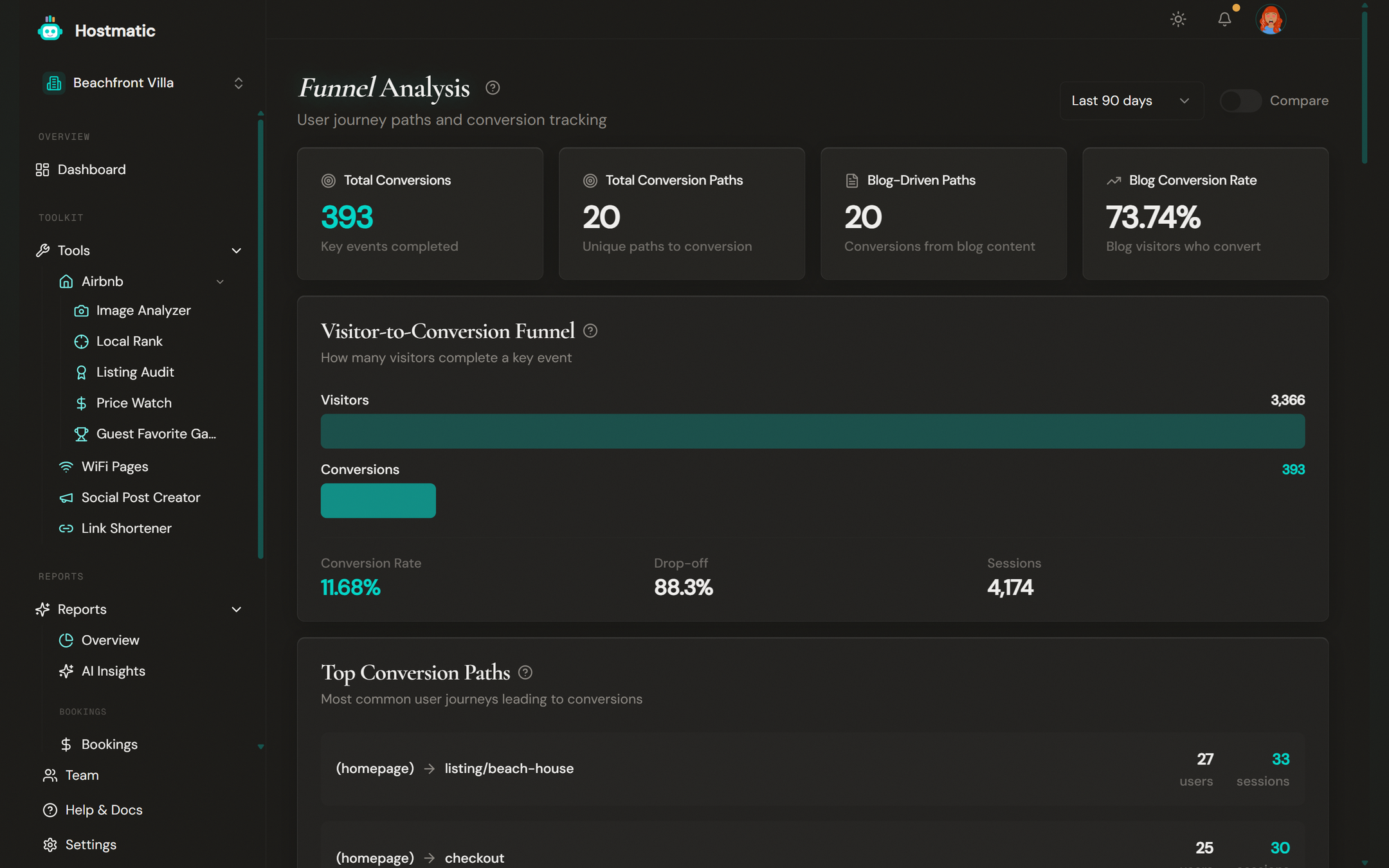
What You'll See on the Page
At the top there's a date-range selector (Last 7 / 14 / 30 / 90 days, plus Last 6 months and Last year on higher plans — the available ranges are capped by your plan) and a period-comparison toggle that overlays the previous period's numbers.
Summary Stats
Three cards give you the headline numbers:
| Card | What It Shows |
|---|---|
| Total Conversion Paths | The number of unique page-to-page journeys that ended in a conversion |
| Blog-Driven Paths | How many of those conversion paths passed through your blog content |
| Blog Conversion Rate | The share of blog visitors who go on to convert |
Top Conversion Paths
The most frequent page-to-page journeys users take before completing a conversion event, each showing the number of users and sessions. Paths are reconstructed from GA4 session data.
Blog to Conversion Paths
When you have blog content, this section highlights the journeys that start on a blog page and end in a conversion — a direct read on the ROI of your content marketing.
Landing Page Performance
A bar chart comparing the conversion rate of each landing page (entry point). Blog pages are highlighted so you can see how content pages stack up against the rest of your site.
Highest Converting Pages
A ranked list of your landing pages by conversion rate, with each page's total users and conversions. Pages are flagged high-performing at 5%+, moderate at 2–5%, and low below 2%.
How to Use This Data
- Find your best entry points — In Landing Page Performance and Highest Converting Pages, spot which pages turn visitors into conversions and send more traffic there.
- Measure your content — Use Blog-Driven Paths and Blog Conversion Rate to see whether your blog is actually driving conversions, not just traffic.
- Follow the common journeys — Top Conversion Paths shows the routes people actually take; make those routes faster and clearer.
- Compare periods — Turn on comparison to check whether changes you made moved the numbers.
Data Source
Funnel Analysis is powered entirely by Google Analytics (GA4) — conversion paths and blog analytics are derived from your GA4 session and event data. Connect GA4 from the Integrations page in the sidebar. If a section shows "No data available," sync your GA4 data first.
Note: For the high-level visitor → sessions → bookings funnel, see the Overview page (
/insights). Funnel Analysis focuses on the page-level journeys and landing-page conversion behind that funnel.