
How to Access
- In the sidebar, click Tools to expand the menu
- Click Airbnb
- On the Airbnb tools hub page, select Image Analyzer
The Two Scan Types
Hero Scan
Scores the first 5, 8, or 10 photos that appear in your Airbnb search-result carousel — these are the photos that decide whether a guest clicks on your listing in the first place.
You get:
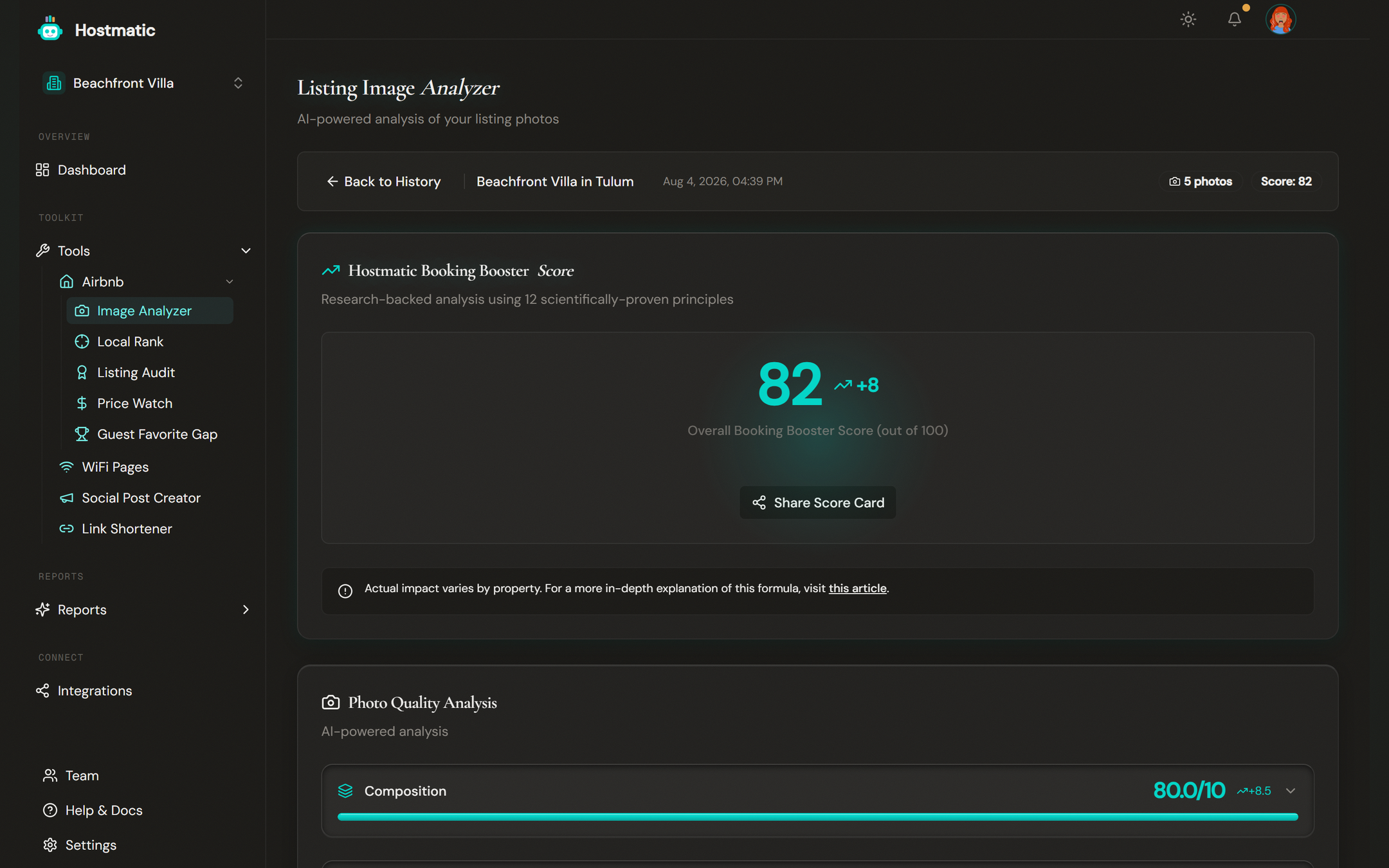
- Booking Booster Score (0–100) — an aggregate score across the hero set
- Color-coded band — green ≥ 80, yellow 50–79, red < 50
- Per-section sub-scores — Composition, Color, Figure-Ground, Professionalism
- Per-photo feedback with concrete improvement suggestions
- Shareable OG card — generate a public link to your Hero Scan result to share on social
Hero Scan scores are comparable run-to-run, so they're the right scan type for tracking progress over time. If your hero set scores 62 today and 78 next month after you reshot the cover, that gain is real.
Library Audit
Audits every photo in the listing individually and returns a ranked, weakest-first list with replacement suggestions. There's no aggregate Booking Booster Score — averaging across 20+ photos isn't a meaningful number — but you get a clear "fix these first" queue.
Use Library Audit when you want a comprehensive cleanup pass on the whole gallery.
Credits
| Operation | Credits |
|---|---|
| Hero Scan — 5 photos | 15 |
| Hero Scan — 8 photos | 18 |
| Hero Scan — 10 photos | 22 |
| Hero Scan reanalysis (same listing) | 8 / 10 / 12 |
| Library Audit | 8 + ceil(photos × 0.7) |
| Library Audit reanalysis | 50% off |
Reanalysis means scanning the same listing again — Hostmatic recognizes the listing from a previous run and gives you the discounted rate automatically.
Step-by-Step: Run a Scan
1. Select a Listing
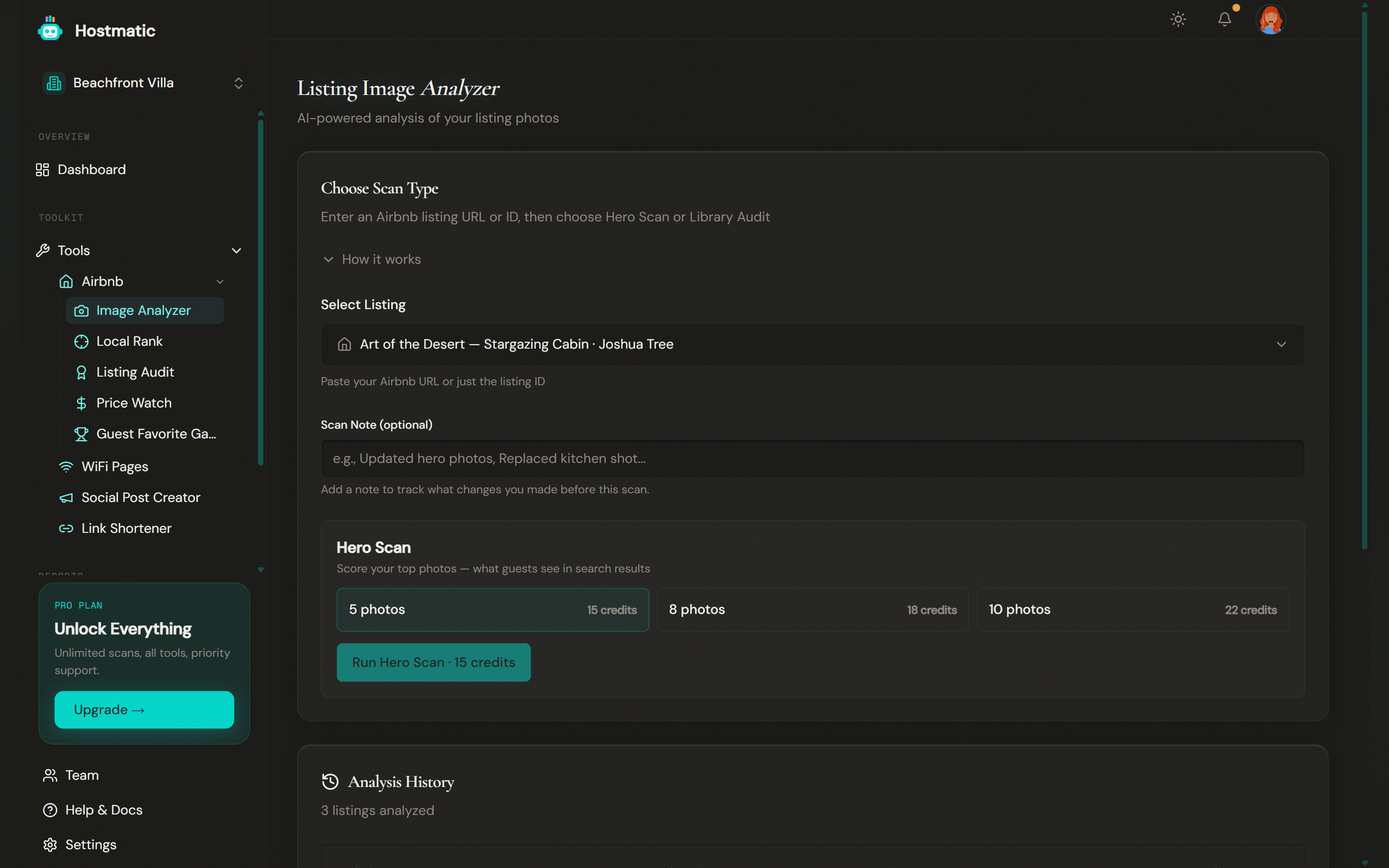
Pick a connected Airbnb listing from the dropdown. To add a new listing, click Add a new listing… and enter the Airbnb Listing ID or URL in the field that appears.
2. Choose Scan Type
The card is titled Choose Scan Type with two separate buttons:
- Run Hero Scan (shows credit cost: 15, 18, or 22 depending on photo count)
- Audit All Photos (shows credit cost: 8 + ceil(photos × 0.7))
For Hero Scan, pick how many photos: 5, 8, or 10.
3. Run
Click the button for your chosen scan type. The two-stage loading card shows progress: first fetching photos from Airbnb, then running the AI analysis. A Hero Scan typically takes 20–40 seconds; Library Audit varies with photo count.
4. Review the Results
For Hero Scan, you land on a results page with the Booking Booster Score ring, per-section breakdown, and per-photo feedback. For Library Audit, you land on a ranked list with weakest photos at the top and replacement guidance for each.
History, Notes, and Compare
Every scan you run is saved to the history table on the landing page. Each row has:
- Listing name (your custom name if set, otherwise the cleaned Airbnb title)
- Scan type and date
- Score (Hero Scan only)
- Editable scan note — click the pencil icon. Useful for tagging context like "after pro photographer reshoot".
- View to reopen the result
- Rescan — defaults to the prior run's scan type and photo count
Open any listing's drilldown to see:
- A trend chart of Booking Booster Score over time
- Stats cards with high/low/latest scores
- A Compare panel that lets you put two runs side-by-side. Compare is apples-to-apples — Hero-vs-Hero only, not Hero-vs-Library.
A date-range filter on the history table is capped by plan: Free 90 days, Weekend 180 days, Pro 1 year.
Editable Listing Names
Each listing has a custom name you can set via the pencil icon in the results header. The custom name shows up everywhere — Image Analyzer, Local Rank, Listing Audit, Price Watch — instead of the raw Airbnb title. Airbnb's SEO suffixes (like " - Houses for Rent in Centro, Yucatán, Mexico - Airbnb") are stripped from the display name even if you don't set a custom one.
How to Use the Results
- Start with the hero image. Photo #1 has the biggest impact on click-through in Airbnb search.
- Fix the lowest-scored photos first. Library Audit ranks them in order — work top to bottom.
- Re-shoot, replace on Airbnb, rescan. Use the inline Rescan button on the history row. With reanalysis pricing it's cheap to track progress.
- Use scan notes to capture the "why." Three months from now, a trend chart with "reshot living room", "added pool wide-shot" tells a story; an untagged chart is just numbers.
Tip: Professional photography is one of the highest-ROI investments for Airbnb hosts. If a Hero Scan returns a score under 60, hiring a photographer almost always pays back in the first few extra bookings.
Failure Guard
If zero photos analyze successfully (e.g. they all failed to download from Airbnb), the run is rejected with a clear error and your credits are refunded automatically — no misleading zero-score run is persisted. Any leftover failed runs can be cleaned up from the history page.
Common Questions
- The tool can't find my listing. — Use the full Airbnb URL (e.g.
airbnb.com/rooms/12345678). Photos are pulled directly from Airbnb. - My score dropped after I changed photos. — A few possibilities: the new photo set has different composition issues, the order on Airbnb shifted (so different photos are in the "hero" 5/8/10), or one heavily-weighted photo got worse. Use the Compare panel to spot the difference.
- Why can't I compare a Hero Scan to a Library Audit? — They score different things and use different methodologies. Comparing them would be misleading.
- Can I share my results? — Yes. Hero Scan results have a "Share" action that generates a clean public OG card link.